
How to Cancel Your Blueticks Subscription or Free Trial
Cancelling Blueticks takes a few clicks, no emails and no calls. Here is where the button is, what a trial cancel does differently from a paid one, and how refunds work.
Daniel Roth4 min read
On this page
You can cancel Blueticks yourself, from your account page, in under a minute. You do not need to email anyone first. This page covers where the button is, what each step asks, what changes for your access, and how a refund works if you were charged recently.
How do I cancel my Blueticks subscription?
- Sign in at app.blueticks.co and open Buy Subscription in your account menu.
- Under "Want to go back to the free plan?", click Cancel subscription.
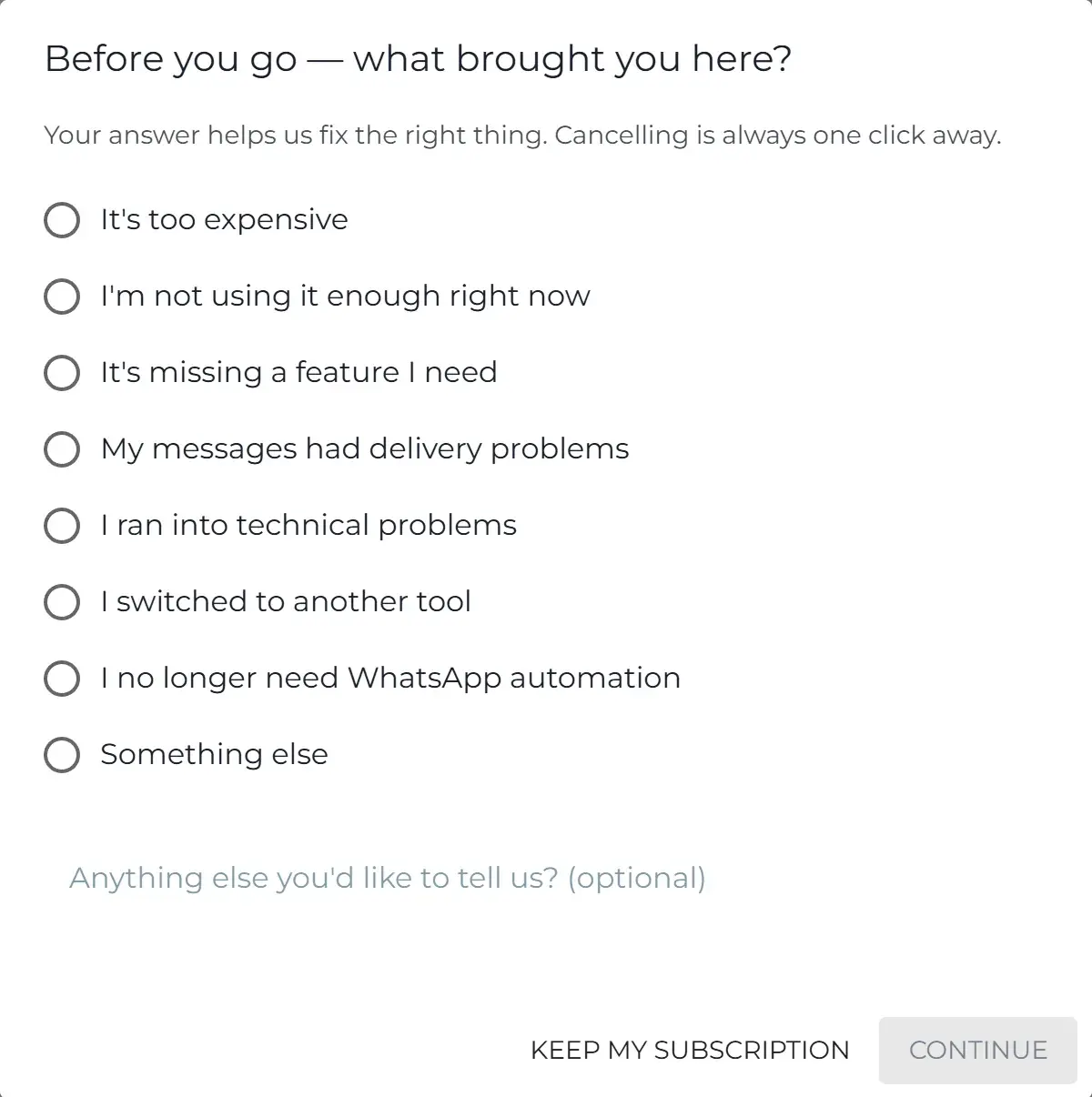
- Pick the reason that fits best and click Continue. We ask because the answer shows us what to fix.
- You may see one offer. To cancel anyway, click No thanks, cancel.
- Click Cancel subscription to confirm.
The cancel button is only shown when there is a live paid plan or trial to cancel. If you do not see it, your plan may already be set to end, or you may already be on Free.
What are the offers in step 4?
Which offer you see depends on the reason you picked. None of them blocks the cancel button, and you can ignore all of them.
- Not using it enough, or no longer need WhatsApp automation: pause your plan for 1 or 3 months instead. Your data, settings and connections stay put, and billing stops while paused.
- Too expensive: a discount on your next renewal. You may instead be offered a yearly plan at a lower price.
- Missing a feature, delivery problems, or technical problems: a link to contact support. These are often a quick fix on our side.
- Switched to another tool, or something else: no offer.
If you are on a free trial, you will see the reason step but no offer, since there is nothing to pause or discount.
What happens to my access after I cancel?
It depends on whether you were paying or trialing.
Paid plan. Your subscription is cancelled at the end of the current term. You keep every feature of your plan until that date, and you are not charged again.
Free trial with no card added. When you cancel one, the trial ends right away and access to the trial plan stops immediately. You have not been charged and you will not be.
Free trial where you added a card. If you added a card to keep the plan after the trial, cancelling works like a paid plan: it ends at the end of the term and you keep access until then.
After a paid plan ends, you are on the Free plan: 3 scheduled messages at a time, and they only send while WhatsApp Web is open. If you relied on always-on sending, which is a Pro feature, plan for that change before your term ends. You can resubscribe at any time.
Can I get a refund?
Yes, if you ask within 14 days of the payment. This covers the first payment and every renewal, and you do not need to give a reason.
- Email support@blueticks.co from the address on your Blueticks account, so we can find it.
- We refund to the original payment method, within 14 days of your request.
Payments older than 14 days are not refunded, except where the law requires it. The full wording is in the Terms of Service and the subscription guide.
A common mix-up: cancelling does not refund by itself. Cancel stops future charges. A refund is a separate request for a payment you already made. If you want both, cancel and send the email.
Frequently asked questions
I was charged and I did not expect it. What should I do? Write to support from your account email. If the payment is within 14 days, you can have it refunded in full.
Can I just stop for a month? Yes, that is the pause offer in step 4. It appears when you say you are not using Blueticks enough right now.
I only wanted to stop my trial. Use the same steps. If you never added a card, the trial ends right away and nothing is charged. If you added one, the trial ends at the end of the term and you keep access until then.
If you want to know what each plan includes before you decide, see the subscription guide. If something broke and that is why you are leaving, tell us in step 3 or at support@blueticks.co.